


Entrega expressa mundial com rastreamento e seguro • Envio dos EUA • Frete grátis

Descrição
Quick Specs
2U rack server
Processor | Max: 56 Cores2x Gen 4 / 5th Gen Intel Xeon Scalable
Memory | Max: 8TB32 ECC DDR5 RDIMM 4800Mhz
Storage | Max: N/AFront bays:
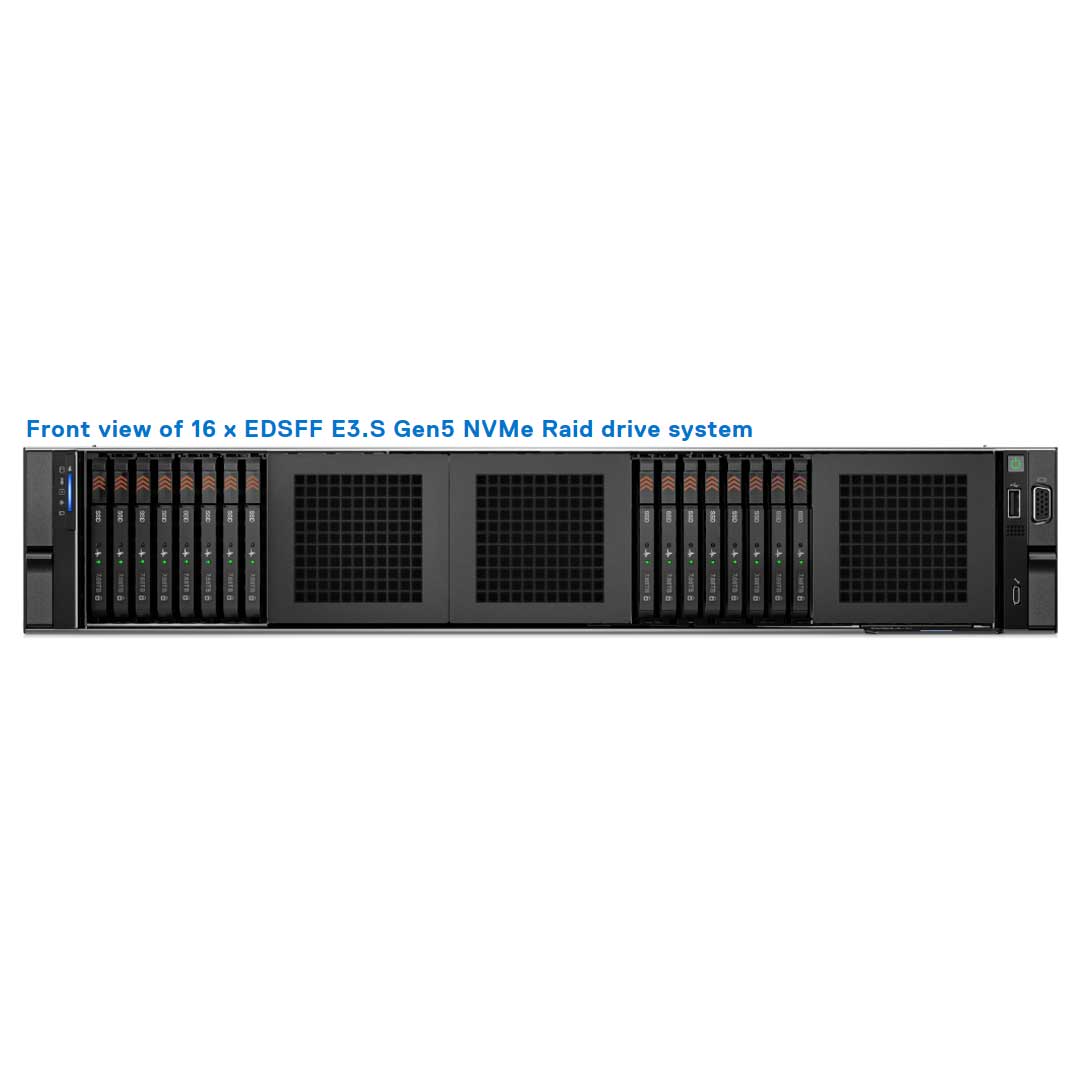
Up to 16 x 2.5" EDSFF E3.S
Rear bays:
Only Supported on the 12x 3.5" and 24 Bay Universal Chassis
Boot Optimized Server Storage (BOSS-N1) Hot-Swap
Internal USB
S160 (SATA/NVMe SW RAID)
H355i, H755, H755N, H965i, HBA355i, H355e, HBA355e, H965e
2 x 1GE LOM / 25 or 100 GbE x 2 (DPU Must be Installed)
Networking OptionsOCP 3.0 x8 Mezz 3.0
Remote Management:iDRAC9 with Lifecycle Controller
PCIe Slots:Up to 8 x PCIe Gen5 or Gen 4 slots
SNAP Support | Slot 7 SNAPI: 1 x16 Gen5 FH, HL
GPU:Up to 2 x 350 W DW
6 x 75 W SW
12 x 3.5-inch and rear drive configuration systems do not support a GPU card.
- Dell PowerEdge R710
- Dell PowerEdge R720
- Dell PowerEdge R720XD
- Dell PowerEdge R730
- Dell PowerEdge R730XD
- Dell PowerEdge R740
- Dell PowerEdge R740XD
- Dell PowerEdge R740XD2
- Dell PowerEdge R7415
- Dell PowerEdge R7425
- Dell PowerEdge R750
- Dell PowerEdge R750XA
- Dell PowerEdge R750XS
- Dell PowerEdge R7515
- Dell PowerEdge R7525
- Dell PowerEdge R760
- Dell PowerEdge R760XA
- Dell PowerEdge R760XS
- Dell PowerEdge R760XD2
- Dell PowerEdge R7615
- Dell PowerEdge R7625
(Click to View)
Ideal for:
- Artificial Intelligence (AI)
- Data Analytics
- Database
- Machine Learning (ML)
- Virtual Desktop Interface (VDI)
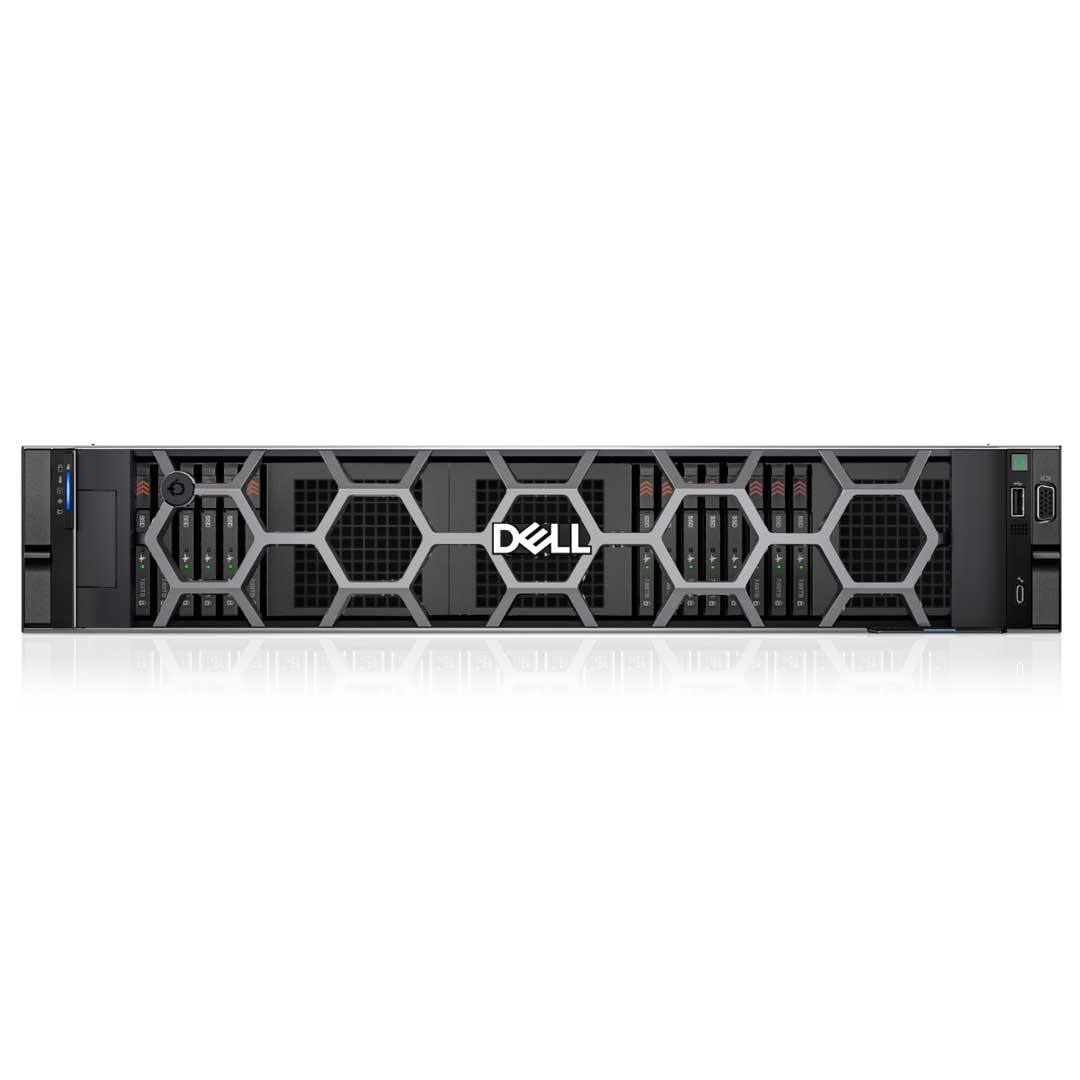
The Dell PowerEdge R760 is a 2U dual-socket rack server built to handle demanding enterprise workloads, including AI and machine learning applications. This full-featured, cyber-resilient server delivers robust performance in a purpose-built mainstream design suited to modern data centers.
There is no 16-bay backplane. Each of these configurations below is built with multiple 8 EDSFF E3.S Backplanes.
- 16 x EDSFF E3.S (Gen5 x 4 NVMe Direct)
- 16 x EDSFF E3.S (NVMe RAID) - Dual fPERC (H965i)
There are so many options we had to split them up to make it easier to understand the scale the R760 can perform.
 12x 3.5" SAS/SATA
 8x 2.5" SAS/SATA/NVMe
 8x 2.5" NVMe
 8x 2.5" EDSFF E3.S
 24x 2.5" SAS/SATA/NVMe
 24x 2.5" NVMe Passive
 24x 2.5" NVMe Switched
Up to 2 x 4th Gen Intel® Xeon® Scalable or Intel® Xeon® Max Processors with up to 56 cores
There are three types of heat sinks for this Dell R760 Rack server. The heat sink option is based on the configuration and the TDP of the CPU. Any TPD above 250W will be liquid-cooled.
- STD HSK ≤ 165 W (supports only 2.5-inch drives and non-GPU configuration)
- 2U HPR HSK 165 W–350 W (supports 2.5-inch drives and non-GPU configuration)
- L-type HSK Supports all GPU/FPGA configurations
Any Processors TPD above 250W will need the liquid-cooled system installed.
CPUs 9480, 9470, 8470Q and 6458Q are supported only in liquid cooling configuration.
Cooling on this Dell Gen16 server comes in two forms: air-cooled or Direct Liquid Cooled (DLC). Opting for DLC on the CPUs removes the rear VGA port, though it can be restored either at the front or rear — with the rear option consuming a PCIe slot.
GPU and FPGA cards on this system require a 1U L-type heat sink and GPU shroud, with GPU configurations limited to High-Performance Gold (HPR Gold) fans only.
Six hot-swap fans come standard on this system, with fan type varying by CPU TDP and overall configuration — similar to how heat sink selection works. The supported fan types are outlined below.
Up to six hot-swap fans- Standard (STD) fans
- High-performance Silver (HPR Silver) fans
- High-performance Gold (HPR Gold) fans
- For TDP that are 250W+ requires DLC
Installing a rear drive on the Dell PowerEdge R760 requires the High-Performance Gold fan, unless the CPU TDP reaches 270W or higher.
Each rear drive cage requires an additional fan for proper cooling, along with an airflow baffle — both of which are included when rear drives are ordered.
Rear drives supported on the 12 LFF and the 24 SFF Chassis.
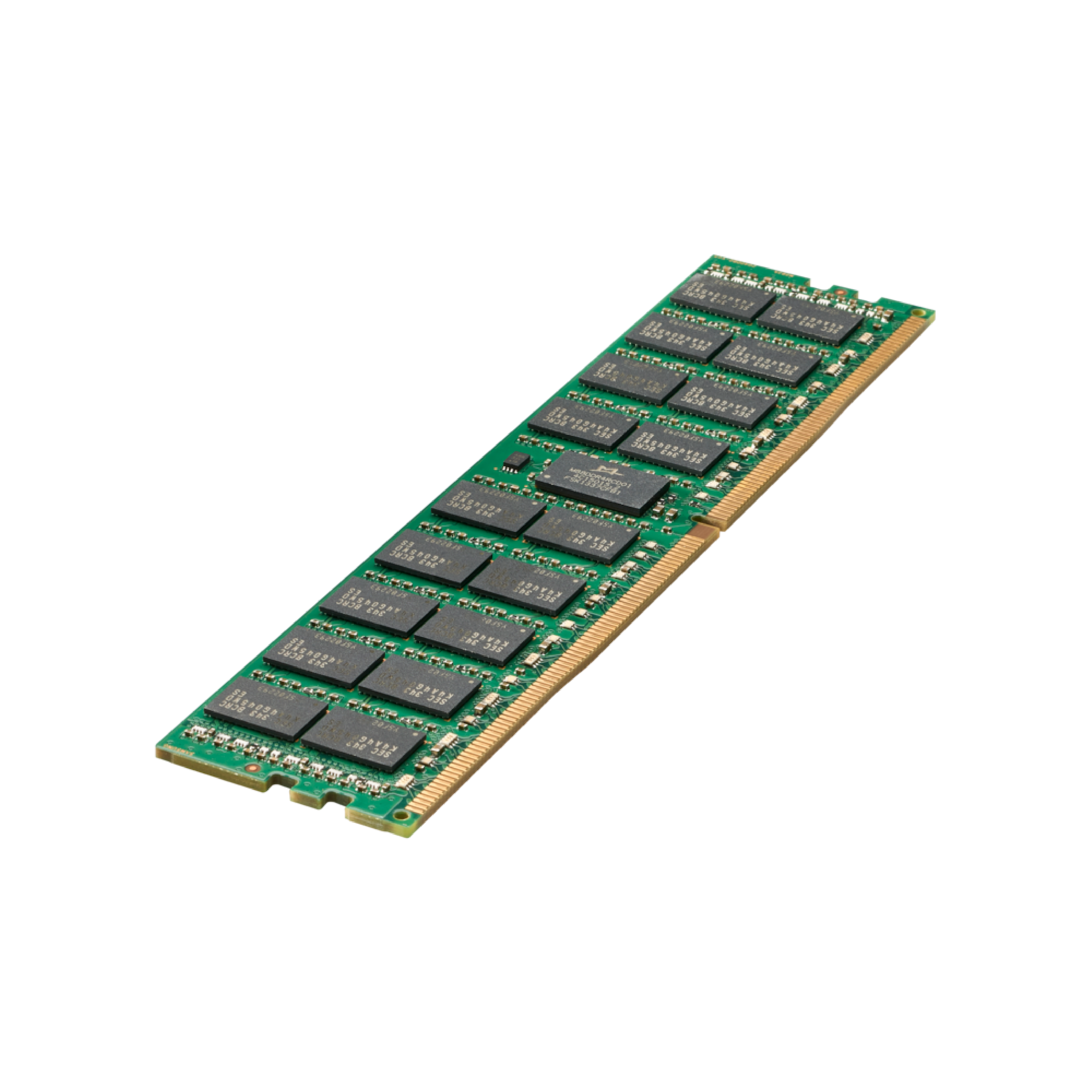
In-memory workloads get a boost from up to 32 DDR5 RDIMMs at 4400 MT/s (2DPC), or up to 4800 MT/s when limited to 16 DDR5 RDIMMs (1DPC).
| DIMM Type | DIMM Rank | DIMM Capacity | Single Processor | Dual Processor | ||
|---|---|---|---|---|---|---|
| Minimum system capacity | Maximum system capacity | Minimum system capacity | Maximum system capacity | |||
| DDR5 RDIMM | Single Rank | 16 GB | 16 GB | 256 GB | 32 GB | 512 GB |
| Dual Rank | 32 GB | 32 GB | 512 GB | 64 GB | 1 TB | |
| Dual Rank | 64 GB | 64 GB | 1 TB | 128 GB | 2 TB | |
| Quad Rank | 128 GB | 128 GB | 2 TB | 256 GB | 4 TB | |
| Octa Rank | 256 GB | 256 GB | 4 TB | 512 GB | 8 TB | |
Dell's RAID controller lineup includes the fPERC solution, delivering a base RAID hardware controller that skips PCIe slot usage entirely — accomplished through a small form factor, high-density connector to the base planar.
PERC11 and PERC12 controllers are both supported on this system, with dual-controller setups possible using one fPERC and one APERC card. Check the manual's cabling section for supported configuration details.

| Supported storage controller cards | |
|---|---|
| Internal controllers | PERC H965i PERC H755 PERC H755N PERC H355 |
| External controllers | HBA355e PERC H965e |
| Internal Boot | Boot Optimized Storage Subsystem (BOSS-N1): HWRAID 2 x M.2 NVMe SSD USB |
| Software RAID | S160 |
| SAS Host Bus Adapters (HBA) | HBA355i |
| NOTE: PowerEdge does not support Tri-Mode, the mixing of SAS, SATA, and NVMe behind the same controller. | |
| NOTE: The Universal Backplane supports HW RAID for SAS/SATA with direct attach NVMe, and does not support HW RAID for NVMe. | |
This server includes a boot option via 2x M.2 NVMe drives on the optional BOSS-N1 card, as seen across most Dell systems — though its position shifts depending on which risers or rear drives are installed.
The BOSS-N1 card carrier installs without a system shutdown; powering down is only needed for installing the BOSS-N1 controller card module.

| Components in kit | R760 (quantity) |
|---|---|
| BOSS-N1 controller card module | 1 |
| BOSS-N1 card carrier | 1 or 2* |
| M.2 NVMe SSD | 1 or 2* |
| M.2 NVMe SSD capacity label | 1 or 2† |
| BOSS-N1 card carrier blank | 1 |
| M3 x 0.5 x 4.5 mm screws | 1 |
| BOSS-N1 power cable for Riser 1 (220 mm) | 1 |
| BOSS-N1 signal cable for Riser 1 (170 mm) | 1 |
| BOSS-N1 power cable for x4 rear drive module (260 mm) | 1 |
| BOSS-N1 signal cable for x4 rear drive module (240 mm) | 1 |
NIC support on the Dell PowerEdge R760 (Gen16) comes down to a choice between the LOM card or the MIC card — only one can be installed at a time. Separately, the OCP 3.0 slot remains available regardless of which one you choose.

- 1 GbE x 2
The standard LOM on the Dell PowerEdge R760 is optional and supports 2x 1Gb ports via a BCM5720 LAN controller.
Management Interface card (MIC)
- 25 GbE x 2
- 100 GbE x 2
Installing a Dell Data Processing Unit (DPU) card requires the MIC to be installed as well — and since the MIC uses the LOM ports, a separate LOM card cannot be installed alongside it.
Open Compute Project (OCP) 3.0
- 1GbE x 4
- 10 GbE x 2
- 10 GbE x 4
- 25 GbE x 2
- 25 GbE x 4
Note that installing an x16 card in the OCP 3.0 slot will downgrade to x8 due to this system board's OCP limitations. Port capacity also differs between the two options — the LOM caps out at two ports, while the OCP 3.0 slot handles cards with up to 4 ports.
This system offers up to 8x PCIe Gen4 or 4x PCIe Gen5 slots, spread across 4 riser slots with 15 riser cards forming 14 distinct PCIe riser configurations. Take time reviewing the options, and reach out for support if needed — the table below maps each riser card to its corresponding configuration.
| Config No. | Riser configuration | No. of Processors | PERC type supported | Rear storage possible |
|---|---|---|---|---|
| 0 | NO RSR | 2 | Front PERC | No |
| 1 | R1B+R2A+R3B+R4B | 2 | Front PERC/PERC Adapter | No |
| 2 | R1Q+R2A+R3B+R4Q | 2 | Front PERC/PERC Adapter | No |
| 3-1 | R1P+R2A+R3B+R4P (HL) | 2 | Front PERC/PERC Adapter | No |
| 3-2 | R1P+R2A+R3B+R4P (FL) | 2 | Front PERC/PERC Adapter | No |
| 4-1 | R1P+R2A+R3B+R4R (HL) | 2 | Front PERC/PERC Adapter | No |
| 5-1 | R1R+R2A+R3A+R4P (HL) | 2 | Front PERC/PERC Adapter | No |
| 5-2 | R1R+R2A+R3A+R4P (FL) | 2 | Front PERC/PERC Adapter | No |
| 6 | R2A+R4Q | 2 | Front PERC/PERC Adapter | Yes |
| 7 | R1Q+R2A+R4Q | 2 | Front PERC/PERC Adapter | Yes |
| 8 | R1B+R2A | 1 | PERC Adapter | No |
| 9 | R1Q+R2A+R4R | 1 | Front PERC | No |
| 10-1 | R1P+R2A+R4R (HL) | 1 | Front PERC | No |
| 10-2 | R1P+R2A+R4R (FL) | 1 | Front PERC | No |
| 11 | R1 Paddle + R2A + R3B + R4 Paddle | 2 | N/A | No |
| 12 | R1Q+R2A+R4Q | 2 | Front PERC/PERC Adapter | Yes |
Riser Cards
 Riser 1B 2x16 (R1B)
 Riser 1R 2x16 (R1R)
 Riser 1R-FL 2x16 (R1R-FL)
 Riser 1P 1x16 (R1P)
 Riser 1P-FL 1x16 (R1P-FL)
 Riser 1Q 2x16 (R1Q)
 Riser 2A 2x16 (R2A)
 Riser 3A 1x16 (R3A)
 Riser 3A-FL 1x16 (R3A-FL)
 Riser 3B 2x8 (R3B)
 Riser 4P 1x16 (R4P)
 Riser 4P-FL 1x16 (R4P-FL)
 Riser 4B 2x16 (R4B)
 Riser 4Q 2x16 (R4Q)
 Riser 4R 2x16 (R4R SNAPI)
 Paddle Card Kit
GPU support on this system tops out at two double-wide 350W accelerators or six single-wide 75W accelerators. Installing GPUs requires swapping the default air shroud for the GPU air shroud, which also needs a filler installed whenever a single-width GPU card or empty riser slot is present.
All GPU/FGPA cards require 1U L-type HSK and GPU shroud.
- Double Width (DW) GPU only supported on Riser Configurations 3-2, 5-2, or 10-2
- RC 5-2: Supports DW GPU only on slot 7
- RC 10-2: Only supports a single processor configuration.
- RC 10-2: Supports DW GPU only on slot 2.
| Components | GPU FL Kit | |
|---|---|---|
| Details | Quantity | |
| Risers | Riser configuration (RC) 3-2, 5-2*, or, 10-2* | RC 3-2: R1P^ (FL) + R2A (HL) + R3B (HL) + R4P^ (FL) RC 5-2: R1R (FL) + R2A (HL) + R3A (FL) + R4P^ (FL) RC 10-2: R1P^ (FL) + R2A (HL) + R4R (FL) |
| Shroud | GPU shroud | 1 |
| Fans | HPR GOLD fan | 6 |
| Heat sinks | L-type heat sink for processor 1 and processor 2 | RC 3-2, 5-2: 2 RC 10-2: 1 |
| Cables | Power cable | 2 x 4 (8-position) or 2 x 6 + 1 x 4 (12-position + 4-sideband) |
| FL - Full Length, HL - Half Length, HPR - High Performance, RC - Riser configuration | ||
| 12 x 3.5-inch and rear drive configuration systems do not support a GPU card. | ||
Two redundant Hot-Swap AC or DC power supply units.
- 2800 W Titanium 200—240 VAC or 240 HVDC,
- 2400 W Platinum 100—240 VAC or 240 HVDC,
- 1800 W Titanium 200—240 VAC or 240 HVDC,
- 1400 W Platinum 100—240 VAC or 240 HVDC,
- 1100 W Titanium 100—240 VAC or 240 HVDC,
- 1100 W LVDC -48 — -60 VDC,
- 800 W Platinum 100—240 VAC or 240 HVDC,
- 700 W Titanium 200—240 VAC or 240 HVDC,
Width with Ears: 482.0 mm (18.97")
Width without Ears: 434.0 mm (17.08")
Height: 86.8 mm (3.41")
Length: 736.29 mm (28.98") Ear to PSU handle
Weight: A server with fully populated drives 36.1 kg (79.58 lbs)
A server without drives and PSU installed 25.1 kg (55.33 lbs)
Sem pagamentos adicionais • Sem custos extras
Tarifas, impostos e todas as taxas aplicáveis estão incluídas. A entrega porta a porta é realizada sob o regime de entrega com direitos pagos (DDP). Todos os envios são totalmente rastreados e segurados.
A entrega porta a porta é realizada sob os termos "Delivered Duty Paid" (DDP), com rastreamento completo e seguro.
Gerenciamos todos os procedimentos de importação e desembaraço aduaneiro em todo o mundo. Tarifas, impostos de importação, taxas e encargos aduaneiros estão incluídos para todos os destinos, e nenhum pagamento adicional é necessário.
Tarifas, todos os impostos, taxas e encargos estão incluídos
Não há custos adicionais nem pagamentos extras. Todos os envios são totalmente rastreados e segurados. Impostos, tarifas, taxas e encargos alfandegários estão incluídos em todo o mundo. Enviamos com entrega designada (DDP) via UPS, FedEx, DHL, USPS , transportadoras, redirecionadores ou a transportadora de sua escolha.
Peças de servidores e equipamentos de TI
Ver tudo
Envio
Sim, enviamos para o mundo todo. Oferecemos frete GRÁTIS ou, se você quiser entrega expressa, pode escolher o serviço e os custos de frete serão aplicados, eles serão adicionados no checkout.
Não, os impostos estão incluídos e com frete grátis.
Usamos todas as principais transportadoras e parceiros de correio locais. Você será solicitado a selecionar um método de entrega durante a finalização da compra.
Sim, oferecemos frete grátis para o seu país.
produtos
Nosso objetivo sempre é garantir que nossos clientes amem nossos produtos, mas se você precisar devolver um pedido, ficaremos felizes em ajudar. Basta nos enviar um e-mail diretamente e nós o guiaremos pelo processo.
Outro
Você pode entrar em contato conosco através da nossa página de contato! Teremos o maior prazer em ajudá-lo.
Qualquer pergunta?
Se ainda não respondemos à sua pergunta, entre em contato conosco abaixo e retornaremos o mais breve possível.